How to Fix MyITLab Access
MyITLab relies on cookies and specific permissions to operate properly. There are times when you click on a particular simulation or assignment and it does not let you in or it simply does not load. Here is what you can do to solve this.
- Ensure that you are using the recommended browser and version. MyITLab runs best on Google Chrome. So if you have not done so, install Google chrome or update Chrome ot its latest version
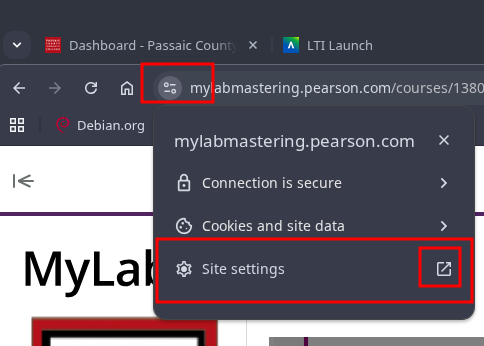
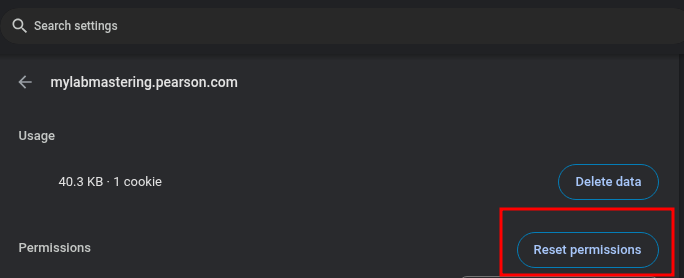
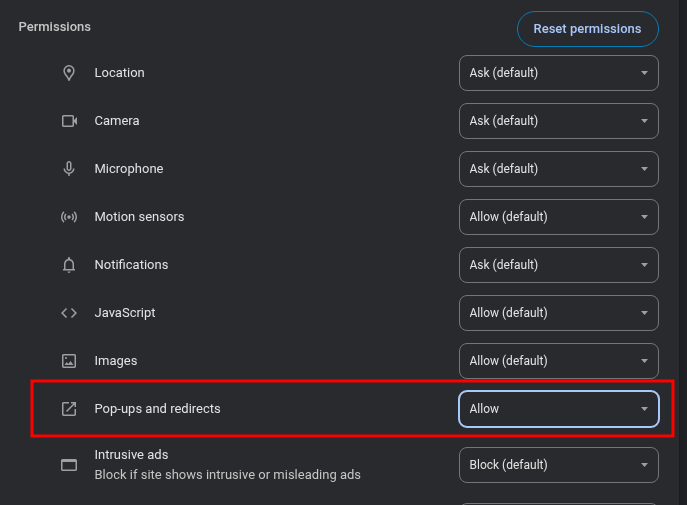
- Reset MyITLab Permissions and then set the necessary permissions manually. The main permission is “Popups and redirect”. Make sure to set it to “allow”. Here are some screenshots to guide you



s